Santa's Daily Activity Games1.1.2
Publisher Description
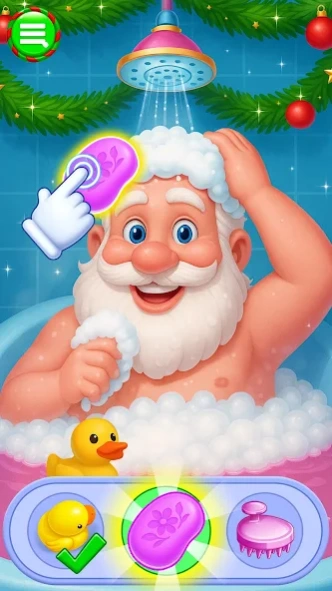


Join Santa in fun festive activities, from spa & dress-up to holiday party prep
🎅 Get Santa ready for Christmas with festive fun!
Santa’s Daily Activity Games is packed with lighthearted tasks and holiday charm. From spa treatments and dress-up to dance and celebration, every activity brings you closer to the magic of Christmas.
Help Santa refresh with spa care, style his look, decorate with festive outfits, and prepare him for the big holiday season. You can even enjoy dancing, cleaning, and bedtime routines that make this casual holiday game full of variety and cheer.
🌟 Key Features
🎄 Prepare Santa for Christmas with fun seasonal tasks
💇 Give Santa a hair spa & style festive looks
🧖 Enjoy face spa & refreshing care routines
🛁 Help Santa relax with a bath before his big day
👗 Dress Santa in stylish holiday outfits
🧹 Use cleaning tools to tidy up festive spaces
🎶 Watch Santa dance to different music beats
🌙 Complete bedtime routines before Christmas Eve
✨ Why You’ll Love It
- Relaxing and casual festive gameplay
- A cheerful mix of spa, dress-up & holiday activities
- Perfect for spreading Christmas spirit with family & friends
👉 Download Santa’s Daily Activity Games today and enjoy a cozy, fun-filled Christmas season! 🎁🎉🎅
About Santa's Daily Activity Games
The company that develops Santa's Daily Activity Games is GameiMake. The latest version released by its developer is 1.1.2.
To install Santa's Daily Activity Games on your Android device, just click the green Continue To App button above to start the installation process. The app is listed on our website since 2026-03-13 and was downloaded 0 times. We have already checked if the download link is safe, however for your own protection we recommend that you scan the downloaded app with your antivirus. Your antivirus may detect the Santa's Daily Activity Games as malware as malware if the download link to com.gameimake.santasdailyroutineactivities is broken.
How to install Santa's Daily Activity Games on your Android device:
- Click on the Continue To App button on our website. This will redirect you to Google Play.
- Once the Santa's Daily Activity Games is shown in the Google Play listing of your Android device, you can start its download and installation. Tap on the Install button located below the search bar and to the right of the app icon.
- A pop-up window with the permissions required by Santa's Daily Activity Games will be shown. Click on Accept to continue the process.
- Santa's Daily Activity Games will be downloaded onto your device, displaying a progress. Once the download completes, the installation will start and you'll get a notification after the installation is finished.
Program Details
System requirements
Download information
Pricing
Version History
version 1.1.2
posted on 2026-03-13
- Minor Crash Resolved & Game Play improved.
